



WiZ Connected is the kind of smart lighting app I find most useful when several people share the same home. Instead of treating a lamp as a gadget that belongs to one phone, it turns everyday lighting into something the household can adjust, coordinate, and use without constantly reaching for a wall switch. I tested it with the mindset of a normal resident rather than a lighting enthusiast: arriving home, changing the mood in a room, leaving lights ready for someone else, and trying to understand where personal control ends and shared control begins.
That last point matters more than the colorful lighting effects. A connected bulb can be fun, but in a shared apartment or family home, the real question is whether everyone can use it without confusion. WiZ Connected is free to install, is rated for Everyone, and comes from Signify Netherlands B.V., the company behind the WiZ smart light system. Its average rating is 4.4 from around 59 thousand ratings, while more than 1 million people have installed it. Those figures suggest that it has moved beyond the novelty stage, although popularity does not remove the need to plan how it will be used at home.
How WiZ Connected fits into a shared home
A practical evening with more than one person
Imagine a household where one person is cooking, another is reading, and somebody else is getting ready for bed. With ordinary bulbs, the nearest switch usually decides what happens to everyone. WiZ Connected makes the lighting itself more flexible: a room can be brighter for a task, softer for relaxing, or changed without walking across the room. I like that this can reduce small interruptions. Nobody has to interrupt dinner just to make the living room less bright, and the person reading does not need to accept the same lighting as everyone else.
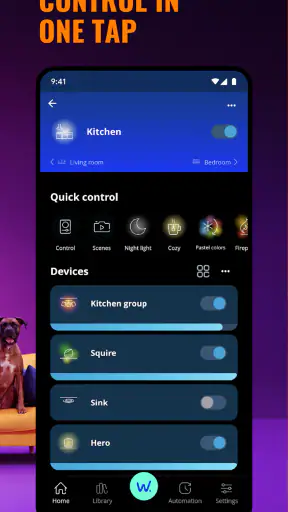
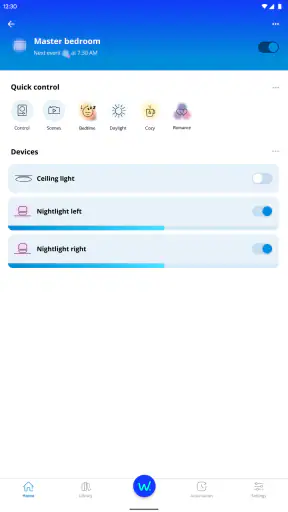
The most useful habit is to think in terms of rooms and routines rather than individual bulbs. If the household agrees that the main room should have a comfortable evening setting, that choice becomes easier to repeat. A shared device can then feel predictable instead of magical: people know what a tap will affect and which room it belongs to. This is especially helpful when guests or less technical relatives use the home, because they do not need to understand every lighting option to benefit from the setup.
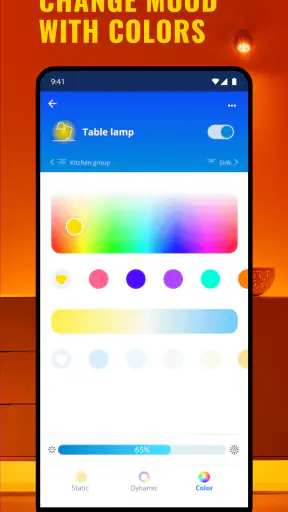
There is also a trade-off. Shared convenience can become shared frustration if two people try to change the same light in opposite ways. One person may want bright white light for cleaning while another wants a warm, subdued room for watching television. The app cannot solve a household disagreement about atmosphere. My advice is to reserve detailed color choices for situations where they are genuinely useful and keep the everyday default simple enough that everyone can live with it.
Where the app is stronger than a normal switch
A conventional switch is immediate and dependable, but it only offers the choices wired into the room. WiZ Connected is better when the household wants lighting to adapt to activities. I found the difference most noticeable at transition points: coming home, settling down in the evening, or changing a room from work mode to rest mode. The advantage is not that every moment needs a special scene; it is that the same physical light can serve several purposes without replacing the bulb or adding another fixture.
Compared with a basic bulb-control app, WiZ Connected feels more suitable for a home with several lights because the value grows when rooms are considered together. Compared with a traditional switch, it asks more from the user during setup and depends on the connected system being available. Compared with buying a separate smart-home platform, it can be a more focused choice for someone whose main goal is lighting rather than a large collection of household devices.
I would not choose it merely because smart lighting sounds modern. If you only need one lamp to turn on and off in exactly the same way every day, a normal switch may be cheaper in effort and easier for every resident. The app earns its place when flexible control, room atmosphere, or remote-style convenience matters enough to justify learning a new way to operate the lights.
Getting started without taking over the household
The first setup should be done by the person who understands the home’s network and lighting layout, but that person should not automatically become the only person who can use the system. I recommend installing the bulbs, naming rooms clearly, and testing each light before inviting anyone else to rely on it. A name such as “main room lamp” is more helpful than a vague label that only makes sense to the installer.
WiZ Connected runs on Android from version 9 onward, which makes it accessible on many still-used phones. The app itself is free, though in-app purchases range from $0.99 to $3.99 per item. That means the initial decision is not simply whether the app costs anything to download; a household should also decide whether optional purchases fit its budget before building expectations around them.
One setup boundary is particularly important: the phone used during installation should not be treated as the permanent owner of the lighting experience. In a shared home, relying on one person’s device creates a practical bottleneck. If that person is away, busy, or has changed phones, everyone else may feel locked out of something that should be communal. I would establish the room structure first, then make sure the people who genuinely need day-to-day access understand how to use it.
At the same time, I would avoid giving every visitor a role in changing the system. A guest who can adjust a light for one evening does not necessarily need to participate in the long-term organization of rooms and routines. The distinction between everyday use and system administration is easy to overlook because a lighting app feels harmless, but it keeps the household calmer when the setup is treated as a shared utility rather than a toy that anyone can rearrange.
Boundaries between personal phones and shared spaces
WiZ Connected is installed on personal devices, while the lights belong to physical spaces. That difference creates a boundary the household should discuss early. A bedroom lamp may feel personal even if it is part of the same connected system as the kitchen. A shared living-room light has a different social purpose. I found that naming and room organization are not cosmetic details; they help clarify which controls affect everyone and which ones are relevant to one person.
For a couple or family, I would begin with the common areas and add private rooms only when there is a clear reason. This reduces accidental changes and makes the first experience less overwhelming. It also gives children or less technical users a smaller, understandable part of the system instead of exposing them to every possible control at once.
People should also agree on what happens when the app and the wall switch disagree. Smart lighting is less convenient if someone repeatedly cuts power at the switch and then wonders why the app cannot control the bulb. I would explain this in plain language to everyone in the home: the bulb needs to remain available to the connected system, while the app handles the everyday changes. That single household rule prevents a surprising amount of confusion.
Coordinating routines without creating arguments
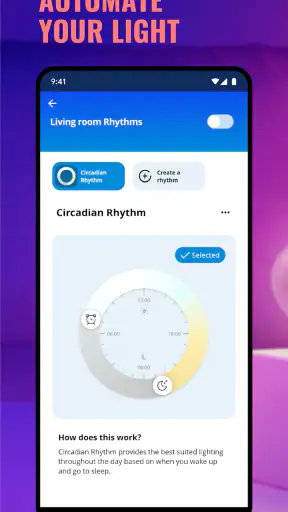
The best shared lighting arrangements are based on agreed moments, not on trying to automate every preference. A household might want a softer setting in the evening or a clearer light during chores. Those are collective needs. Personal color experiments and unusual effects are better treated as temporary choices, especially in rooms used by several people.
I also recommend deciding who is allowed to change a default. If one resident creates a setting that works for them but not for the rest of the home, the problem is not technical. It is a coordination problem. A quick agreement such as “common rooms return to the household default after use” makes the app feel more reliable because the next person is not inheriting a surprise.
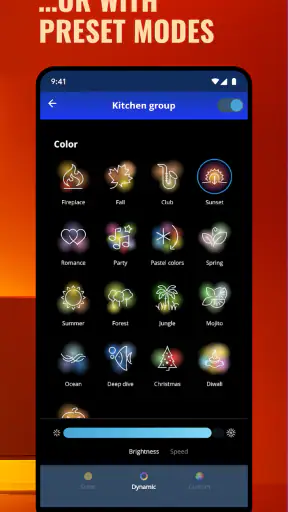
Another useful practice is to keep the number of favorite settings limited. Too many choices can make a simple light feel like a control panel. I prefer a small set that maps to real activities: ordinary use, focused work, relaxing, and perhaps a special occasion. This is one of the less obvious strengths of a connected lighting system: the household can create a shared vocabulary for light. The less obvious weakness is that somebody has to maintain that vocabulary when habits change.
Age, trust, and everyday responsibility
The Everyone age rating makes WiZ Connected approachable for a broad household, but an age label does not tell you how much responsibility a particular person should have. Younger users may enjoy changing colors, while adults may want to keep the room structure stable. I would let children explore in a shared space when the household is comfortable with it, but I would not assume that every child should manage the system’s organization or make purchases.
This is also where trust matters. Lighting control may seem low-risk, yet it still affects sleep, privacy, comfort, and the bill. A person who repeatedly turns lights on at inconvenient times can disrupt others even without malicious intent. Clear expectations are more useful than pretending the app itself will manage family behavior. Decide which rooms are communal, which changes are welcome, and who handles troubleshooting.
The app is a good fit for older relatives who prefer a phone to a complicated collection of switches if the household keeps the interface and room names understandable. It is less suitable when somebody strongly dislikes app-based control or needs a guaranteed physical fallback at all times. In that situation, connected lighting should complement familiar controls rather than replace them completely.
What I noticed about reliability and friction
The central limitation is dependence on a connected setup. A physical switch is easy to understand because its behavior is visible. An app introduces more points where a user can become unsure: the wrong room, the wrong light, a changed setting, or a bulb that is no longer responding as expected. Even when the system is working correctly, the mental model takes time to learn.
That friction is manageable when the household uses consistent names and avoids unnecessary complexity. It becomes more noticeable in homes where people move between rooms quickly and expect every control to be self-explanatory. I would not recommend filling the system with elaborate scenes before the basic operation feels natural. Start with one or two rooms, learn how everyone uses them, and expand only when the benefit is obvious.
Version 1.37.5 shows that the app is an actively maintained product rather than a forgotten companion utility, but a version number alone does not guarantee that every phone or home will behave identically. Keeping the app current is sensible, especially when several household members use different devices. Still, updates can also change where controls appear or how familiar actions feel, so the person responsible for the setup should be willing to explain changes instead of assuming everybody will discover them.
The optional purchase range is another point to handle openly. The app is free, but the presence of in-app purchases means I would check the screen carefully before confirming anything and make sure shared devices are not being used casually for paid extras. This is less about the amount of an individual item and more about keeping household expectations clear, particularly when children use a phone that is also connected to the lighting system.
Who should use it, and who should skip it?
I would recommend WiZ Connected to people who already own compatible WiZ lighting or are specifically building a lighting-focused smart home. It makes sense for renters and families who want more flexibility without redesigning a room, and it is useful for anyone who regularly changes lighting between practical and relaxing activities. Shared living rooms, kitchens, home offices, and bedrooms with different evening needs are where the concept feels most worthwhile.
I would be more cautious about recommending it to someone who wants a completely device-free home. If the thought of maintaining an app, teaching other residents, or explaining connected bulbs sounds irritating, the usual alternatives may serve better. A standard bulb and switch win on simplicity. A broader smart-home platform may be preferable for someone who wants lighting to coordinate closely with many other kinds of devices, provided they are comfortable with a larger ecosystem.
It is also not the right choice for a household that cannot agree on basic control rules. No lighting app can make a shared room feel comfortable when every resident has a different idea of how it should behave and changes it without warning. In that case, a simpler arrangement, separate lamps, or clearly assigned controls may provide a better experience than adding more flexibility.
My household verdict after living with the idea
What I appreciate most about WiZ Connected is not the novelty of controlling a lamp from a phone. It is the possibility of making lighting fit the rhythm of a shared home. When rooms are named sensibly, defaults are agreed upon, and personal experimentation stays within reasonable limits, the app can remove small daily annoyances and give each space more than one useful purpose.
My reservations are equally practical. Setup belongs to one person at first, but everyday control should not remain trapped with that person. Shared access needs boundaries, and the household must understand the difference between changing a light and reorganizing the system. The app also asks users to accept a little more complexity than a wall switch, and that complexity is not worthwhile for every room or every family.
For me, WiZ Connected is best viewed as a cooperative household tool. It is free to start, accessible to a wide age range, and focused enough to avoid forcing a full smart-home commitment. I would install it when flexible room lighting solves a real problem, begin with common spaces, keep the controls understandable, and decide in advance who maintains the setup. Used that way, it becomes a quiet convenience rather than another piece of technology demanding attention.
My recommendation is simple: choose WiZ Connected when your household wants lighting that can adapt to shared routines, but keep the system modest and the boundaries clear. If everyone expects the simplicity of a switch with none of the setup involved, stay with ordinary lighting. If you are ready to coordinate a few rooms and accept the app-based trade-off, WiZ Connected is a thoughtful option for making everyday home lighting more flexible.


